|
Absolutely Essential Newbie Help
Hello, new replacements! I'm your briefing officer, code-named Rapier. We have gathered together some absolutely essential information that will help you to survive and learn in your first few missions. Fighter Ace is no place for the faint of heart. It is populated by highly skilled pilots who are honed by relentless competition. This information will be invaluable to your continued survival! Please print these from your Web browser by hitting the Print button. Have these instructions by your side before flight!
Getting Started
Configure the program offline to match your game setup. Set up and calibrate your stick, rudder, and views.
Go to Game Rooms under Fighter Ace.
Click on the arena you wish to fly in. It is strongly recommended that you start in the Boot Camp Team area first.
Click on Fly Now.
It will take a few moments for the program to load up. You will then see the main menu. Select Fly.
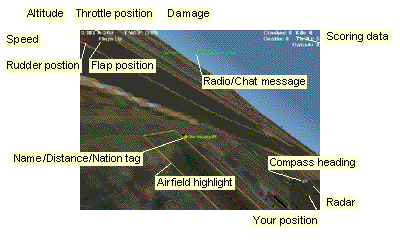
You will see your cockpit view. You will be started at the runway closest to the center. Hit F8 and you can check these items: a. ALT-F3 (highlight runway) b. ALT-F5 (Name tag) c. CTRL-F5 (Distance tag) d. CTRL-Shift-F5 (Rank tag) e. CTRL-ALT-F5 (Nationality tag).
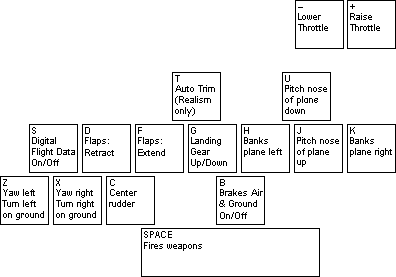
Hit B to release your brakes. You will be steering on the ground with the rudder. If you are using the keyboard for your rudder, the Z key is left rudder, X is right rudder, and C centers the rudder. Watch for enemy strafers who may be coming right down the runway, from either in front of or behind you. Use the 2 key on the keypad to look behind you.
Steer down the center of the runway and watch for craters (big black blotches on the runway).
a. Your runway may have been bombed. If you hit a crater, your plane will explode. You can steer around the craters and take off.
b. Flaps will shorten your takeoff run.
c. In severe cases, you may not be able to take off from this runway at all. Hit CTRL-Shift-A and select another runway from the menu by hitting 1-4 and ENTER.
Navigation and Flight
Shift-M brings up your tactical map, which shows things that are right in your local area (approximately 25% of the world view). Ctrl-M will bring up your strategic map showing strategic targets.
a. Your aircraft is a white cross in the center of the map. There is a white line that indicates your direction of travel, and a colored line that points to the nearest enemy aircraft.
b. Other fighter aircraft are represented by colored crosses: red for Russian, yellow for USA, green for Britain, purple for German.
c. Bombers appear as a number of colored diamonds traveling very close together in formation.
d. You can locate targets on the map. Airfields are lines; circles are factories and tank farms.
Control of your aircraft is essential to survival. On your way to the fight, practice turning. Bank the aircraft by moving the stick to the side or hitting the H (Left) or K (Right) key. Tighten the turn by pulling back on the stick or hitting the J key.
The other essential skill is being able to see your enemy all the time.
a. Practice with your view keys so that you can see 360 degrees around you and anywhere above your wings.
b. Particularly important are the forward, forward/up, up, rear/up, and rear views that are used in a dogfight.
Alternatively, you can use padlock view to track enemies. Padlock will lock on a single plane and track it.
a. F4 padlocks enemy.
b. ALT-F4 padlocks friend.
c. E padlocks nearest enemy.
d. W padlocks nearest friend.
e. , cycles to next enemy.
f. . cycles to previous enemy.
Entering Combat
Your guns have a maximum range of 1500-2200 feet, depending on type (cannon shoot farther). Use the Range tag to tell range.
You must lead (shoot ahead of the target's path) to hit it. Use the F3 (full forward view) to get a gunsight.
Look around you frequently. Someone else may be lining you up as well.
Flight Controls
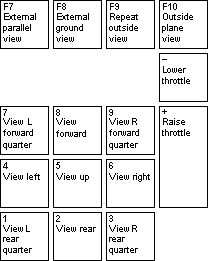
View Keys
Communication Commands
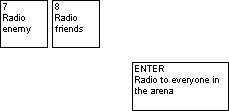
Radio Commands
Enter Chat to everyone
8 Chat to friends
7 Chat to enemy
L Log of all radio chat
Directional Views
Use the keypad numbers to look in any direction
Keypad 5 to look up
CTRL-Keypad Number to look 45 degrees up in any direction
ESC to exit game
Special Keys:
CTRL-Keypad numbers
Gives you a 45-degree up view in any direction. Shift-M Tactical map
CTRL-M Strategic map
ALT-F3 Highlight runway
ALT-F5 Name tag
CTRL-F5 Distance tag
CTRL-Shift-F5 Rank tag
CTRL-ALT-F5 Nationality tag
CTRL-Shift-A Change airfield
F3 Full view
F4 Padlock enemy
ALT-F4 Padlock friend
E Padlock nearest enemy
W Padlock nearest friend
, Cycle to next enemy
. Cycle to previous enemy
G Landing gear up/down
F Flaps up
D Flaps down
B Brake air/wheel
F1 Command list
|