|
Tired of just going up and down? Ben Chiu, author of the best-selling Inside Moves Flight Simulator books from Microsoft Press discusses helicopter flight, and his upcoming Flight Simulator 2000 strategy guide!
by Ben Chiu
Welcome back, fellow Flight Simulator fans!
Although I'm primarily a fixed-wing pilot in both the real world and virtual world, I really enjoy the thrill and challenge of flying helicopters from time to time. Although I don't have a whole lot of time in real JetRangers, I can tell you that aside from a couple of well-known flight modeling issues (which are being addressed in the upcoming Flight Simulator 2000), the Bell 206B in FS98 flies pretty darn close to the real thing. However, as with many other things, having the proper equipment and setup is critical to your experience, enjoyment, and success with this fascinating aircraft.

Flying helicopters are fun and challenging. Try landing on top of the World's Trade Center!
Pssst? the secret is in the setup
Although you can fly the FS98's JetRanger by keyboard alone in forward flight, all bets are off if you want to hover. My recommendation is if you're serious about flying helicopters in FS98 do yourself a favor -- get yourself a joystick and a good set of rudder pedals. (A joystick that has a twist axis rudder control like the Microsoft SideWinder sticks, will be as good or better for many people, so that's another option.)
One of the most important characteristics you should look for in a joystick (aside from quality, compatibility, durability, and after-sales support) is you'll want one that doesn't center too firmly. That's because a stiff joystick will hamper your efforts to hover. (The cyclic control in a real helicopter doesn't center by itself either.)
Once you've got a joystick and pedals, the next most important things to check are the sensitivity settings under Options: Custom Controls. You can read all of the specific details about how to do this in my Flight Simulator 98: Inside Moves
book, but basically what you're looking for are settings that correspond with full travel movements on your controller and the controller position indicators on your instrument panels.
Goin' round and round
Now that you've got the equipment and correct setup, here are some brief tips on hovering helicopters in FS98:
- Anticipate control requirements -- You need to almost act before the aircraft actually needs/asks for control movement. For example, you need to apply left cyclic before the aircraft banks too far to the right.
- Use quick, precise control movements instead of control pressure -- Fixed wing aircraft are flown much of the time by applying control pressure instead of blatant control movements. Hovering requires the exact opposite.
- Minimize control inputs -- While this may seem contrary to our last tip, the concept is to use the minimum control deflection possible. Many people incorrectly tend to apply opposite control inputs equal to or exceeding the amount required. For example, with a 1/2 stick deflection roll to the right, to correct/counteract it will take less than 1/2 left stick deflection.
- Avoid hovering backwards -- The JetRanger's flight model in FS98 will flop and tumble like it wants to weathervane if flown backwards.
- Associate rudder input to a specific part of the aircraft -- One way to eliminate the confusion of which pedal yaws the helicopter which way, is to think of rudder input in relation to the nose of the aircraft. In other words, right pedal moves the nose of the helicopter to the right and left pedal moves the nose of the helicopter to the left.

Learning to hover is tough, but most rewarding. You think landing ON a carrier is tough? Try landing IN one!
Zchoppers are back!
If you ever get tired of flying the JetRanger, fellow Zoner JoeVetK has revamped RallyRat's Zchoppers. Following in the tradition set by ForkBoy2's Zplanes, Zchoppers is a standard set of freeware helicopters designed for multiplayer games here on the Zone.
For anyone unfamiliar with the concept, unless you have the same aircraft installed on your system as what's being flown by another player during a multiplayer flight, you'll only see one of the default aircraft. (In this case it would be the Bell JetRanger.) Standardizing on a set of helicopters removes the headaches and "hit or miss" problems that are associated with multiplayer games.
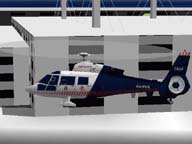
The Aerospatiale SA365n Dauphin 2 is one of the many diversified aircraft found in the Zchoppers set.
Some of the rotary wing aircraft featured in Zchoppers include:
- AH-64 Apache
- Bell 407
- CH-54 Tarhe Sky Crane
- Hughes 500E
- RAH-66 Comanche
- UH-1N Huey
You can download Zchoppers from my personal Web page.
NOTE: As with all downloads off the Internet, please be sure to scan everything for viruses before installing anything on your computer. You can never be too safe in the air or with your computer.
Flight Simulator 2000 book on the way!
I'm really pleased to announce that I'm writing the Official Microsoft Flight Simulator 2000 Strategies and Secrets
book for Sybex Publishing. For anyone new to The Flight Zone, I'm a Commercial Pilot, Certified Flight Instructor, Advanced Ground Instructor, and I hold multiengine and instrument ratings, but most of all (as you can see!) I'm a huge Flight Simulator fan as well!
My upcoming book will feature the hard work of Private Pilots, Commercial Pilots, Certified Flight Instructors, and Airline Transport Pilots all presented in the same user-friendly format that has made my Flight Simulator Inside Moves series of books so popular. The Official Microsoft Flight Simulator 2000 Strategies and Secrets
guide from Sybex will be available very soon.
See you in the Zone!
|